How to Buy a Domain and Launch a Website with RegisterMySite

RegisterMySite Domain purchase guide · Buy a domain, then launch a website
Buy a domain, launch a site: A real purchase from 17 October 2026: search, sign up, verify, add contacts, pay on Stripe, then launch a page.

What this guide covers

A real purchase from 17 October 2026: search, sign up, verify, add contacts, pay on Stripe, then launch a page.

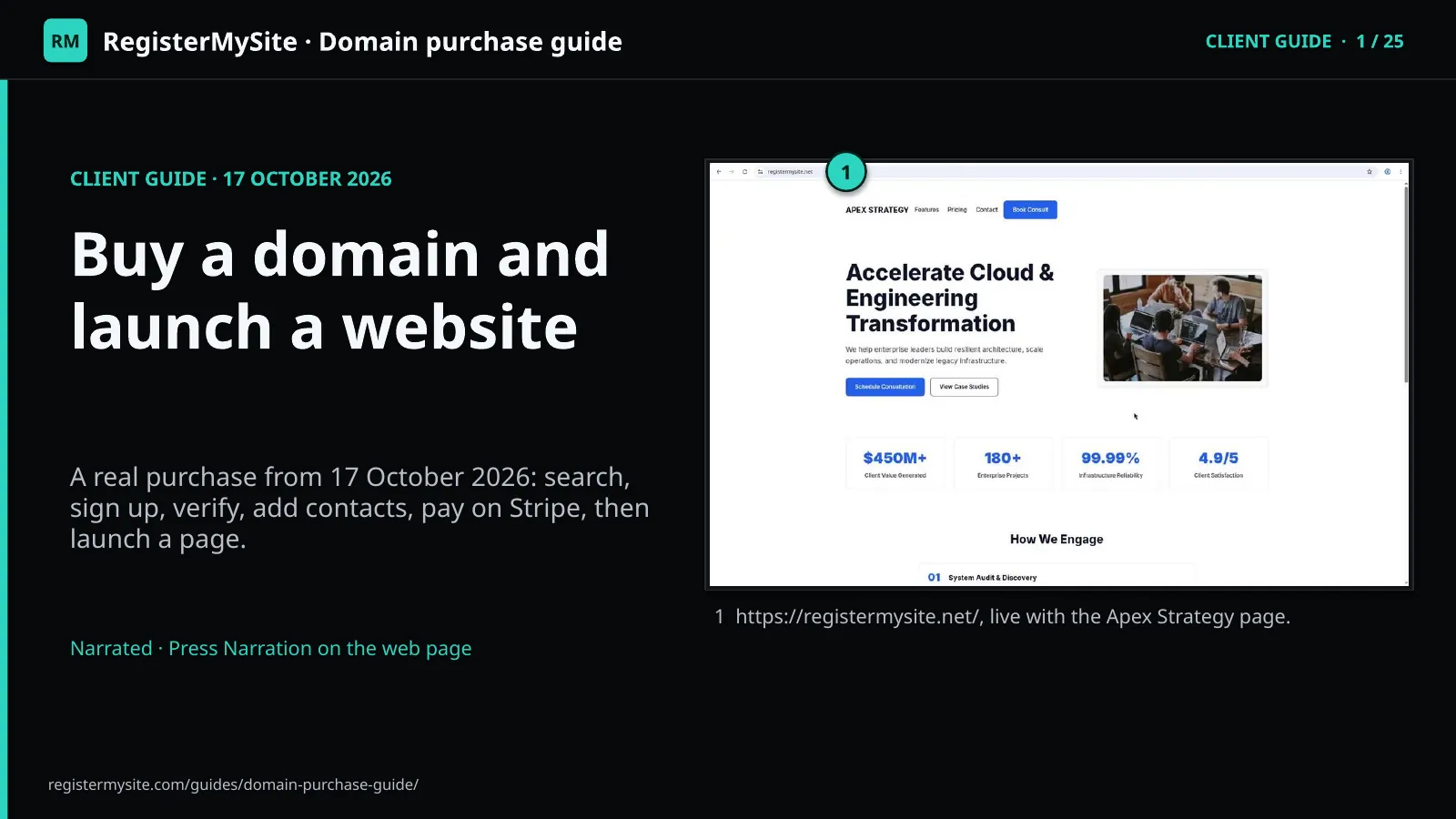
  • https://registermysite.net/, live with the Apex Strategy page.

Slide image missing. Download the PDF or PowerPoint.

The path, in order: Search in Advanced Domain Search and click Purchase.; Create a free account and confirm your email.; Add the registrant contact, tick the confirmation box, continue to payment.; Check the renewal price and the currency, then pay on Stripe.; Publish with HTML Studio, then turn on hosting for your domain.

The whole process, step by step

Search in Advanced Domain Search and click Purchase.; Create a free account and confirm your email.; Add the registrant contact, tick the confirmation box, continue to payment.; Check the renewal price and the currency, then pay on Stripe.; Publish with HTML Studio, then turn on hosting for your domain.

  • Search in Advanced Domain Search and click Purchase.
  • Create a free account and confirm your email.
  • Add the registrant contact, tick the confirmation box, continue to payment.
  • Check the renewal price and the currency, then pay on Stripe.
  • Publish with HTML Studio, then turn on hosting for your domain.

Slide image missing. Download the PDF or PowerPoint.

Search for a domain: At advanced-domain-search.registermysite.com we searched registermysite.uk. It was listed Available at $5.30/yr.

Search for your domain in Advanced Domain Search

Type the name and press Check Availability

Read the price, then click Purchase

At advanced-domain-search.registermysite.com we searched registermysite.uk. It was listed Available at $5.30/yr.

  • The search box: registermysite.uk.
  • registermysite.uk in the Available list.
  • $5.30/yr.
  • Purchase.

Tip: Results show other endings too, each with a yearly price and Purchase.

Slide image missing. Download the PDF or PowerPoint.

Purchase opens sign in: Purchase opened account.registermysite.com in a new tab, on the Sign in page.

Click Purchase, then choose Create account

A new tab opens at Sign in

New here? Click Create account

Purchase opened account.registermysite.com in a new tab, on the Sign in page.

  • Sign in, for existing accounts.
  • Create account, for new customers.

Tip: Already have an account? Sign in here instead.

Slide image missing. Download the PDF or PowerPoint.

Create a free account: The signup form asks for Name, Email and Password. The plan shows Free · $0.

Fill in the free signup form

Name, email and password

The plan shows Free, $0

The signup form asks for Name, Email and Password. The plan shows Free · $0.

Tip: Use an email you can open right now. You'll need it in a moment.

Slide image missing. Download the PDF or PowerPoint.

Verify your email: Next is the Verify email page: “Open the link from your email.” You're already signed in.

Verify your email address

You're signed in

Resend the email if it hasn't arrived

Next is the Verify email page: “Open the link from your email.” You're already signed in.

  • Verify email. Open the link from your email.
  • Resend verification email.
  • Signed in as the new account.

Slide image missing. Download the PDF or PowerPoint.

Confirm your email: The email “Confirm your email for RegisterMySite” comes from no-reply@registermysite.com.

Open the confirmation email and click Confirm email

From [email protected]

The link works for 24 hours, once

The email “Confirm your email for RegisterMySite” comes from [email protected].

  • Subject and sender.
  • Confirm email.
  • Works for 24 hours and can be used once.

Tip: Confirm email takes you straight back to the register page for your domain.

Slide image missing. Download the PDF or PowerPoint.

Order summary and contact: registermysite.com/register shows the order summary, then the registrant contact form: full name, email, phone, address, city, state, postal code and country.

Review the order summary and add the registrant contact

Check the domain and price

Fill in the owner's contact details

registermysite.com/register shows the order summary, then the registrant contact form: full name, email, phone, address, city, state, postal code and country.

  • Domain: registermysite.uk.
  • First-year price $5.30/yr, renewal $5.30.
  • Registrant contact.

Tip: Use your real contact details. They are the legal owner record for the domain.

Slide image missing. Download the PDF or PowerPoint.
Confirm and continue: A .uk name also asks for a UK registrant type. Then tick “I confirm the contact details are accurate…” and press Continue to payment.

Tick the confirmation box and continue to payment

UK registrant type for .uk names

Tick the box, then Continue to payment

A .uk name also asks for a UK registrant type. Then tick “I confirm the contact details are accurate…” and press Continue to payment.

  • I confirm the contact details are accurate… (required).
  • Continue to payment.

Slide image missing. Download the PDF or PowerPoint.

If a domain gets taken: For registermysite.uk the register page answered “That domain is not available.” even though search had listed it.

If a domain gets taken, pick another

Read the message at the top of the page

Go back to search and choose another name

For registermysite.uk the register page answered “That domain is not available.” even though search had listed it.

  • That domain is not available.
  • The domain in the order summary.

Tip: It happens. Head back to search and choose another available name.

Slide image missing. Download the PDF or PowerPoint.

Check the renewal price: Searching registermysite again, we chose registermysite.net at $11.86/yr, renewing at $11.86. The .online and .store names were $4.99, but renew at $27.70 and $42.20.

Compare renewal prices before you buy

Look at the renew line under each price

We chose registermysite.net

Searching registermysite again, we chose registermysite.net at $11.86/yr, renewing at $11.86. The .online and .store names were $4.99, but renew at $27.70 and $42.20.

  • registermysite.online: $4.99/yr, renew $27.70/yr.
  • registermysite.store: $4.99/yr, renew $42.20/yr.

Slide image missing. Download the PDF or PowerPoint.

Check the currency: Stripe Checkout showed “Pay RegisterMySite” and the line item for registermysite.net, 1 year, renews at $11.86/yr. It first showed CN¥82.45.

Check the currency on Stripe Checkout

Pay RegisterMySite on checkout.stripe.com

Switch to US dollars if needed

Stripe Checkout showed “Pay RegisterMySite” and the line item for registermysite.net, 1 year, renews at $11.86/yr. It first showed CN¥82.45.

  • CN¥82.45 was selected first.
  • US $11.86: pick this one.
  • Domain registration: registermysite.net.

Tip: Check the currency before you pay. Switching to US $11.86 fixed it.

Slide image missing. Download the PDF or PowerPoint.

Enter your card and pay: With US $11.86 selected, enter your card details, optionally untick “Save my information with Link”, then press Pay.

Enter your card and press Pay

Optional: untick Save my information with Link

Press Pay once

With US $11.86 selected, enter your card details, optionally untick “Save my information with Link”, then press Pay.

  • US $11.86 selected.
  • Card information.
  • Save my information with Link (optional, unticked here).
  • Pay.

Tip: Card entry was not recorded. Never share card details in a screenshot.

Slide image missing. Download the PDF or PowerPoint.

Registered!: Stripe redirected to account.registermysite.com/dashboard/domains: registermysite.net, Registered, renews Oct 17, 2027 at $11.86.

See your domain registered in the dashboard

Stripe sends you back to Domains

Check the renewal date

Stripe redirected to account.registermysite.com/dashboard/domains: registermysite.net, Registered, renews Oct 17, 2027 at $11.86.

  • registermysite.net, Registered.
  • Renews Oct 17, 2027 at $11.86.

Slide image missing. Download the PDF or PowerPoint.

Your dashboard: The dashboard lists registermysite.net as ready, with a Manage button.

Find your domain on the dashboard

The domain shows as ready

Click Manage for details

The dashboard lists registermysite.net as ready, with a Manage button.

  • registermysite.net, ready.
  • Manage.

Slide image missing. Download the PDF or PowerPoint.

Manage your domain: The Manage page has tabs for overview, dns, hosting, apps, contacts, settings, billing and activity.

Open Manage to see your domain details

Tabs for DNS, hosting, apps and more

Registrar and dates on Overview

The Manage page has tabs for overview, dns, hosting, apps, contacts, settings, billing and activity.

  • The tabs.
  • Cloudflare nameservers.
  • Registrar: Cloudflare Registrar.
  • Registered Oct 17, 2026; expires Oct 17, 2027.

Slide image missing. Download the PDF or PowerPoint.

Pick a template: In HTML Studio, signed in with the same account as the dashboard, click Templates. On “Apex Strategy & Tech”, click Use in Studio.

Open HTML Studio and choose the Apex Strategy template

One login covers every app

Click Templates, then Use in Studio

In HTML Studio, signed in with the same account as the dashboard, click Templates. On “Apex Strategy & Tech”, click Use in Studio.

  • Apex Strategy & Tech.
  • Use in Studio.

Tip: Your RegisterMySite login works in HTML Studio too. No second account needed.

Slide image missing. Download the PDF or PowerPoint.

Template applied: “Template applied” appears and the Apex Strategy page loads in the live preview.

See the template applied in the editor

Template applied appears

Your account shows in the top bar

“Template applied” appears and the Apex Strategy page loads in the live preview.

  • Template applied.
  • Templates.
  • Signed in as the same account.

Slide image missing. Download the PDF or PowerPoint.

Export & Deploy: The PUBLISH ZONE list now includes registermysite.net alongside sites.registermysite.com. We chose sites.registermysite.com and the slug registermysite-net.

Publish a slug with Export & Deploy

Choose sites.registermysite.com

Set the slug registermysite-net, then Publish slug

The PUBLISH ZONE list now includes registermysite.net alongside sites.registermysite.com. We chose sites.registermysite.com and the slug registermysite-net.

  • Publish zone: sites.registermysite.com.
  • Slug: registermysite-net.
  • Slug is available.
  • Publish slug.

Tip: Recommended route: publish to a slug first, then turn on hosting for your domain.

Slide image missing. Download the PDF or PowerPoint.

Your preview link: The preview is at https://sites.registermysite.com/registermysite-net/.

Check the preview on sites.registermysite.com

Open the published slug

The preview is at https://sites.registermysite.com/registermysite-net/.

  • sites.registermysite.com/registermysite-net/

Slide image missing. Download the PDF or PowerPoint.

Turn on hosting: In the account dashboard, open the domain and the Hosting tab. Set App to HTML Studio, enter the slug registermysite-net, type registermysite.net to confirm, then click Turn on hosting.

Turn on hosting for your domain in the dashboard

Open the domain, then the Hosting tab

App, slug, confirm, Turn on hosting

In the account dashboard, open the domain and the Hosting tab. Set App to HTML Studio, enter the slug registermysite-net, type registermysite.net to confirm, then click Turn on hosting.

  • App: HTML Studio.
  • Publish slug: registermysite-net.
  • Type the domain to confirm: registermysite.net.
  • Turn on hosting.

Slide image missing. Download the PDF or PowerPoint.

Hosting is active: The Hosting panel shows Status: active and App: html_studio · Ref: registermysite-net. The overview shows Hosting: active and Live: hosted by HTML Studio.

Confirm that hosting is active

Status: active on the Hosting tab

Live: hosted by HTML Studio on Overview

The Hosting panel shows Status: active and App: html_studio · Ref: registermysite-net. The overview shows Hosting: active and Live: hosted by HTML Studio.

  • Status: active.
  • App: html_studio · Ref: registermysite-net.

Slide image missing. Download the PDF or PowerPoint.

Your site is live: https://registermysite.net/ is live with the Apex Strategy page.

Visit your live website on your own domain

Open https://registermysite.net/

https://registermysite.net/ is live with the Apex Strategy page.

  • registermysite.net in the address bar.
  • The Apex Strategy page.

Slide image missing. Download the PDF or PowerPoint.

Brand, domain, site: Scrolling down reaches the footer: “© 2026 APEX STRATEGY”. You now own an apex domain with a live site that ties your brand together.

Your apex domain and live site, together

Scroll to the footer

Scrolling down reaches the footer: “© 2026 APEX STRATEGY”. You now own an apex domain with a live site that ties your brand together.

  • APEX STRATEGY in the footer.
  • © 2026 APEX STRATEGY.

Slide image missing. Download the PDF or PowerPoint.

Contact: registermysite.com; (562) 751-4597; info@registermysite.com; In person in Los Angeles and Orange County

Get help from RegisterMySite

registermysite.com; (562) 751-4597; [email protected]; In person in Los Angeles and Orange County

  • registermysite.com
  • (562) 751-4597
  • [email protected]
  • In person in Los Angeles and Orange County

Slide image missing. Download the PDF or PowerPoint.

Open the apps from this guide

Open Advanced Domain Search Open HTML Studio Open your account dashboard